Visar inlägg med etikett embedded systems. Visa alla inlägg

måndag 10 augusti 2015

Clock setup for Olimex E407 using STM32CubeMX

Recently I got a reason to dig up my old Olimex E407 board and the RS232 shield I made for it (see earlier posts on this blog). This time though, I'm using Keil in Windows together with a ST Link V2. Getting the clocks and pll's right isn't an easy task, and certainly not a fun one, so I decided to give CubeMX and ST's HAL libraries a try.

The STM32CubeMX program (download it from ST.com) is a fairly new invention, and the libraries leave a lot to whish for still, so you should be careful with it. The libraries are still ful of bugs, but they are also getting a lot better rapidly.

Ok, first of course, download and install STM32CubeMX. If you want to launch it from Keil uVision, add the path to CubeMX to the system path environment variable. The start uVision5 and create a project for an STM407ZG.


Start CubeMX by clicking the "play" button right of the STM32Cube Framework (API).

Now, the Olimex E407 board is equipped with a 12 MHz external crystal clock and a 32.768 kHz external RTC crystal, so we have to enable those pins first.


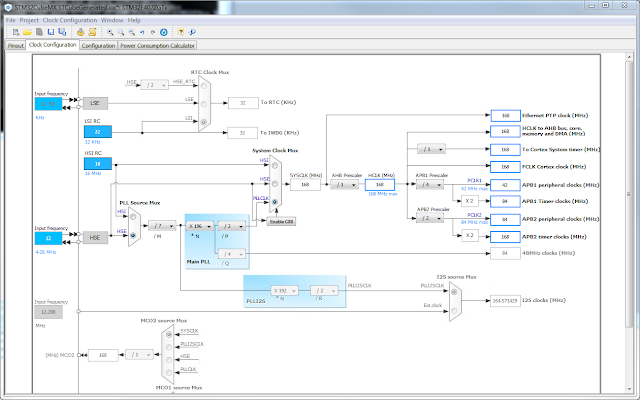
Switch to the "Clock Configuration" tab and input 12 MHz as HSE input frequency and then make the following selections:
  1. Select HSE as PLL Soure Mux
  2. Set the /M divider to /7
  3. Set the *N multiplier to x196
  4. Set the /P divider to /2
  5. Select PLLSLK as System Clock Mux
  6. Set APB1 Prescaler to /4
  7. Set APB2 Prescaler to /2


Save it and select "Generate Code" from the Project menu.

When done, choose to close the CubeMX project and update the settings in uVision5.

A main.c file is generated for you that uses these new settings , ready to be filled in with your applicaiton source.

Good Luck

fredag 24 april 2015

A Comment on Comments

During recent years I have worked with many very tech savvy people worthy of a lot of respect for their insight in embedded development. However, the discussion regarding comments seems to never die. The more tech oriented the developers, the less they seem to like comments in source and the more they seem to believe self commenting code exist. It doesn't. What exist is self commenting thoughts in your head. I have no chance whatsoever to get a good grasp of your ideas without reading them, or asking you.

I have always taken a more customer focused approach, hoping that I won't have to explain myself too many times when I hand over the result of my efforts. Here are some things I would like to point out to all of you that doubt the usefulness code comments:

  • Code in itself can only describe what it does. Everything else are left out. All the experience you gained through experiments, fixing bugs and working with the environment is lost if you don't document it.
  • Code can't explain what it doesn't do. All the alternatives to the approach you have taken. All the quirkyness of the libraries you are using. That takes a long time to get your head around as a new employee or contractor.
  • Code doesn't explain its purpose. In best case, you can read out something from the function name or similar, but most of the time names like openAuxChannel leave you wandering WHY you would like to open an auxiliary channel.
There are lots of other reasons to write and maintain the comments in the source. But there is also the question of the cost for commenting code. If you comment your code you spend time that not feel very productive. In one sense that's correct, you don't write code, so you're not moving towards the goal of the project. But quality has to be considered too, and maintainability and tracability are such parameters. Without them, the quality of your code is poor. It eventually boils down to the cost of developing a feature vs. the cost of owning it. Over time, the cost of owning poor code is MUCH higher than the gain of developing poor code.

So, in the trade-off of commenting source and writing new features, I would like to promote some techniques that I practice:
  • Use doxygen! You might not like browse the source in rendered HTML or PDF documents, but it gives others a great overview and a starting point that lets them get get up to speed with the source quickly.
  • Write commenting scripts that puts skeletons of comments in your files, classes, members and functions. The cost of developing such a script is a lot less than the effort it saves. It takes away a lot of boring work as well! Often the IDE has some functionality for this, but I often get more fields into my doxygen comments with a script.
  • Don't comment getters and setters. Programmers are not stupid, they will understand anyway. Though, if you have a script putting doxygen comment on them, they will become browsable when the documentation is rendered, and that's very convenient.
  • Make sure you add comments to algorithmic code in the functions. These sections of comments are the most valuable. The not only explain your algorithm, it will affect your design too. If you notice that you have to explain flags and states set in objects or structures in other modules etc. it shows that your approach to the problem is probably not coherent enought, or easy enough. If you can't explain what you have done, you should refactor it.

tisdag 18 september 2012

Lean electronic prototyping: Prove your assumptions

Conventionally, when developing electronic devices, companies tend to focus on developing a prototype hardware as the first stage. This is a complicated and expensive strategy that consumes large quantities of energy and money in a design up-front.

A complete electronics development studio, open source only!
There are alternatives however. Today there are many open source circuit boards to choose from off the shelf, that suits almost any need for an embedded system. These boards are extremely cheap, and the tools for them are almost always open source, and thus, also free.

The maker movement and DIY (Do It Yourself) trend has brought embedded development to be a serious hobby alternative for anyone... even kids. And there isn't just toy functionality offered on these cheap hobbyist boards, it is real computer power and connectivity there, such as USB, Bluetooth, internet working, motor control. There are even circuit boards meant to be sewn into your clothes with conducting thread! All from the price of 20$ USD or so. In combination with mobile phones, cloud services and integration with other systems, these systems form a very powerful tool for innovation.

One of the most eye catching applications is off course the home 3D printers that has started to pop up in the market. For about 600$ USD, you get your own mechanical factory! The CAD-tools used for these are also often free and/or open source. With the 3D printers you can manufacture mechanical parts for your invention with very small means. This becomes a very important missing piece in the prototyping process that often tends to become the most expensive step when developing the prototype.

With the right prototyping strategy, a company can focus on developing quite advanced Minimum Viable Products that they actually can test in the hands of a real customer. This will give a much more trust worthy feedback, and will help the company to eliminate waste in the development process.

The sad truth is that the most important properties of a system are the least costly to develop. Many electronic devices are completely depending on a good the user experience, which in most cases are implemented in software. I'm not saying that the industrial design of a device is unimportant, on the contrary, but in the development of a minimum viable product, or prototype, you should focus on proving your assumptions regarding the customers needs/desires. To do this, the shortest and cheapest way is often to realize the solution in software. With the use of a lean prototyping strategy, the trade off between software functionality and industrial design can become less dramatic.

So what's the catch? ...

Well, there are off course down sides of these methods. To face the truth, the quality of the open source tools often leave a lot to wish for. Setting up a development environment based on open source CAN be done, but it takes it's fair amount of googling and experimenting to get it running. The documentation is often in a poor state, or none existing. This puts a big burden on the developers involved and the project becomes a lot more dependent on a high level of skills of the team members.

I would like to point out though, that during my time as a devloper and project manager in embedded systems projects, I cannot recall one single occasion when I have received any useful support from a company we have bought "closed source" tools from. So the increase in risk, is probably leveled out by the probability that you would actually get what you pay for, when using proprietary closed source software.

So keep it lean; focus on the customer, eliminate waste, keep the iterations short.