Recently I got a reason to dig up my old Olimex E407 board and the RS232 shield I made for it (see earlier posts on this blog). This time though, I'm using Keil in Windows together with a ST Link V2. Getting the clocks and pll's right isn't an easy task, and certainly not a fun one, so I decided to give CubeMX and ST's HAL libraries a try.
The STM32CubeMX program (download it from ST.com) is a fairly new invention, and the libraries leave a lot to whish for still, so you should be careful with it. The libraries are still ful of bugs, but they are also getting a lot better rapidly.
Ok, first of course, download and install STM32CubeMX. If you want to launch it from Keil uVision, add the path to CubeMX to the system path environment variable. The start uVision5 and create a project for an STM407ZG.


The STM32CubeMX program (download it from ST.com) is a fairly new invention, and the libraries leave a lot to whish for still, so you should be careful with it. The libraries are still ful of bugs, but they are also getting a lot better rapidly.
Ok, first of course, download and install STM32CubeMX. If you want to launch it from Keil uVision, add the path to CubeMX to the system path environment variable. The start uVision5 and create a project for an STM407ZG.

Start CubeMX by clicking the "play" button right of the STM32Cube Framework (API).
Now, the Olimex E407 board is equipped with a 12 MHz external crystal clock and a 32.768 kHz external RTC crystal, so we have to enable those pins first.

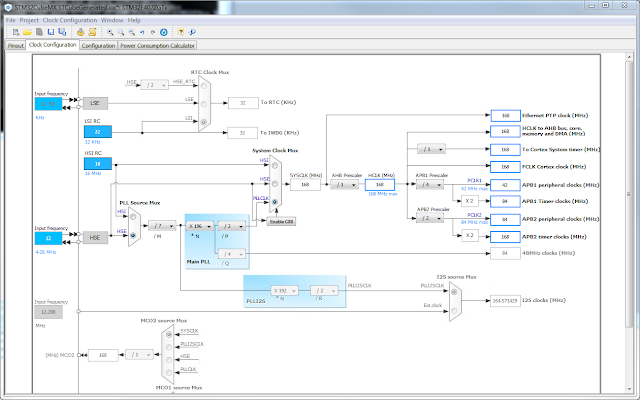
Switch to the "Clock Configuration" tab and input 12 MHz as HSE input frequency and then make the following selections:
- Select HSE as PLL Soure Mux
- Set the /M divider to /7
- Set the *N multiplier to x196
- Set the /P divider to /2
- Select PLLSLK as System Clock Mux
- Set APB1 Prescaler to /4
- Set APB2 Prescaler to /2

Save it and select "Generate Code" from the Project menu.
When done, choose to close the CubeMX project and update the settings in uVision5.
A main.c file is generated for you that uses these new settings , ready to be filled in with your applicaiton source.
Good Luck


